
If the loan option does not show on the portal, the most common reason is that your PMT record was not found against your CNIC. Other common reasons are property that is not in your own name, an incomplete declaration step, a half-filled profile, or a busy portal. Fix your NSER record first, then check your property papers. If it still does not work, call the free helpline 0800-09100.
You log in to acag.punjab.gov.pk. You reach the loan step. But the loan option does not show. Or the category you want is missing.
This is a common problem and it worries people a lot. But in most cases the reason is small and you can fix it yourself.
This guide explains 7 real reasons for this problem. It also tells you the exact fix for each one, in easy steps.
What This Problem Looks Like
People see this problem in different ways. Any of these can happen to you:
- The loan category list is empty
- Only one category shows and the other one is missing
- The Apply or Next button does not work at the loan step
- The portal saves your draft but does not let you go forward
- A message says your PMT record was not found
All of these mean the same thing. The portal is waiting for one thing to be correct before it opens the loan option for you.
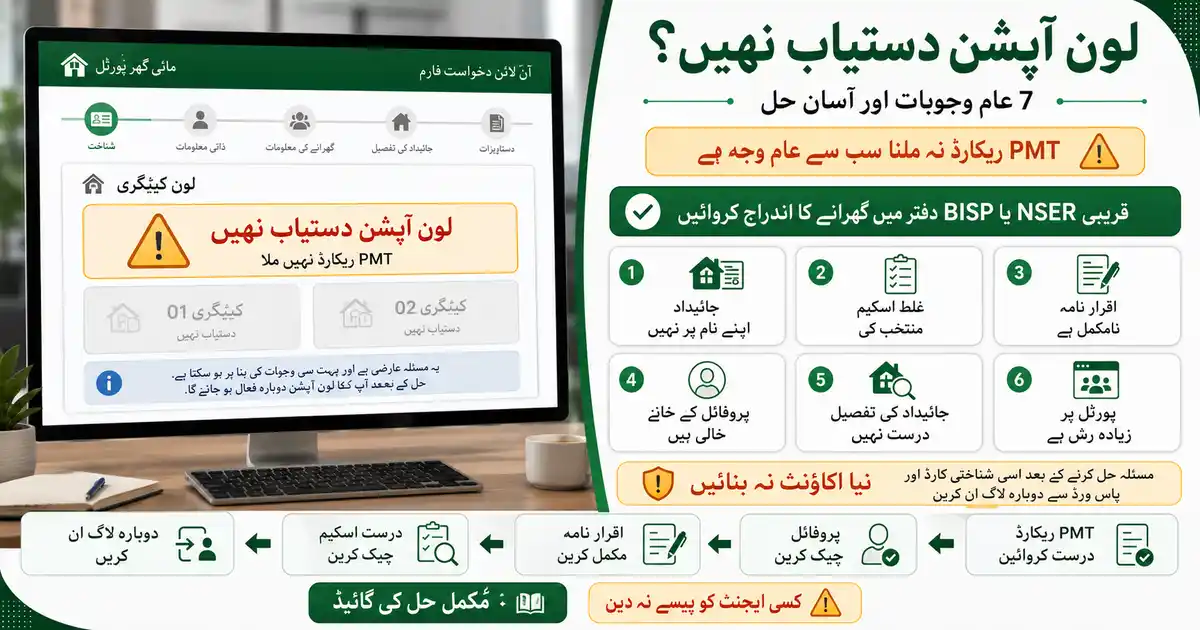
7 Causes and Their Quick Fixes
| Cause | Quick Fix |
|---|---|
| PMT record not found for your CNIC | Get your household registered at the nearest NSER or BISP office, then log in again |
| Property is not in your own name | Apply with the CNIC of the real owner, or get the papers transferred first |
| Property size is above the limit | Check the size rule for your area before you select a category |
| You are in the wrong scheme section | This portal runs more than one scheme. Open the correct scheme first |
| Declaration step is not complete | Open the declaration again and accept every point |
| Profile information is incomplete | Fill every field. Do not leave any required box empty |
| Portal is busy or your browser is old | Try early morning or late night. Use an updated Chrome browser |
Cause 1: PMT Record Not Found (Most Common)
This is the biggest reason, and most websites do not tell you about it.
The portal acag.punjab.gov.pk checks your household record in the NSER database in the background. NSER means National Socio-Economic Registry. It is the same survey that BISP uses. Your household gets a PMT score from this survey.
If the portal cannot find your record, it saves your draft but stops you there. The message tells you that no PMT record was found for your CNIC. It also tells you to go to the NSER office and register first.
So the loan option is not broken. Your household record is simply missing from the system.
How to Fix It
- Take your original CNIC to the nearest NSER or BISP tehsil office in your area.
- Ask the staff to register your household in the NSER survey, or to update your old record.
- Wait for your record to enter the system. Ask the office how many days it will take.
- Log in to the portal again with the same CNIC and the same password. Open your saved draft and go to the loan step again.
Important: use the same login you used before. Do not make a new account. Your draft is saved in your first account.
Cause 2: The Property Is Not in Your Name
The portal matches your CNIC with the property papers. Both must be the same person.
Many people apply with their own CNIC, but the house is in their father's name. Some apply for a house that is in a brother's or wife's name. In these cases the system stops the application.
The fix is simple. The person whose name is on the property papers should apply. If you want to apply yourself, first get the property transferred to your name.
Cause 3: Property Size Is Above the Limit
The housing schemes on this portal have size rules. For the new house scheme, the plot limit is 5 marla in city areas and 10 marla in village areas. A bigger property makes you ineligible for that category.
For Apni Chhat Mehfooz Chhat, the government has not announced a public size limit. The Chief Minister said people can apply with only a CNIC and easy conditions. So check the rule shown on the portal for your own category before you select it.
Cause 4: You Are in the Wrong Scheme Section
This point confuses thousands of people. The portal acag.punjab.gov.pk runs more than one housing scheme. Apni Chhat Apna Ghar is for building a new house. Apni Chhat Mehfooz Chhat is for repairing or growing your old house.
Both schemes sit on the same website. If you open the wrong scheme, you will see the wrong loan options. Or you will see conditions that do not match your need.
Check the scheme name on your screen first. Then select your category. Our scheme comparison guide explains the difference between all three Punjab housing schemes.
Cause 5: The Declaration Step Is Not Complete
Before the loan step, the portal shows a declaration. In it you confirm that you live in Punjab, you own the property, you have no criminal record, and your information is true.
The portal opens the loan option only after you accept every point. If you miss even one box, the next step stays closed.
Open the declaration again. Read each line. Accept every point. Then move forward.
Cause 6: Your Profile Is Incomplete
The portal needs your full profile before it shows the loan option. Check these fields in your account:
- Your full name, exactly as written on your CNIC
- Your CNIC number, with no dashes
- Your father's or husband's name and CNIC
- Your mobile number, on a SIM registered in your own name
- Your division, district, tehsil, and city
Even one empty box can stop the loan option from showing. Fill everything and save your form again.
Cause 7: The Portal Is Busy or Your Browser Is Old
This scheme started on July 17, 2026. The portal is new and thousands of people open it every day. In busy hours some parts of the form do not load fully.
Try these things:
- Log out fully, then log in again. This refreshes your session
- Open the portal early in the morning or late at night
- Use an updated Chrome browser on a phone or computer
- Check that your internet is working properly
- Clear your browser cache and try once more
Fix It in This Order
- Log out and log in again. This alone solves many loading problems.
- Check the scheme name on your screen. Make sure you are in Apni Chhat Mehfooz Chhat.
- Open the declaration and accept every point.
- Check your profile. Fill every empty field.
- Confirm the property papers are in your own name.
- If a PMT message shows, go to your NSER or BISP office and register your household.
- Try again in low traffic hours with an updated browser.
- If nothing works, call the helpline 0800-09100.
One Thing Nobody Tells You Clearly
Many websites write that you need a PMT score of 60 or less for Apni Chhat Mehfooz Chhat. Please be careful with this claim.
That PMT rule is confirmed for the new house scheme, Apni Chhat Apna Ghar. For Apni Chhat Mehfooz Chhat, the government has not announced any PMT limit in public.
At the launch, the Chief Minister said every Punjab resident can apply with only a valid CNIC, and that the conditions are easy. But the portal still checks your NSER record in the background.
So the honest answer is this. Your NSER record matters, because the portal checks it. But no official PMT number has been announced for this scheme. Ask the helpline about your own case instead of trusting any website. We will update this page as soon as the government announces a clear rule.
When to Call the Helpline
Call the free helpline 0800-09100 if you tried all the steps above and the loan option still does not show.
Keep these things ready before you call:
- Your CNIC number
- Your application or draft number, if you have one
- The exact message you see on your screen
- Your registered mobile number
The staff can open your own account and tell you exactly what is missing. You can also visit your DC, AC, or PHATA office and ask the help desk there.
Never pay any agent to unlock your loan option. The portal is free and nobody can open a category for money. Anyone who asks for payment is doing fraud. Report them on 0800-09100.
لون آپشن دستیاب نہیں: اردو خلاصہ
اگر پورٹل پر لون آپشن نظر نہیں آ رہا تو سب سے عام وجہ یہ ہے کہ آپ کے شناختی کارڈ پر PMT ریکارڈ نہیں ملا۔ اس کا حل یہ ہے کہ اپنا اصل شناختی کارڈ لے کر قریبی NSER یا BISP دفتر جائیں اور اپنے گھرانے کا اندراج کروائیں۔ پھر اسی پرانے لاگ ان سے دوبارہ کوشش کریں۔
دوسری عام وجوہات یہ ہیں۔ جائیداد آپ کے اپنے نام پر نہ ہو، اقرار نامہ مکمل نہ کیا ہو، پروفائل میں کوئی خانہ خالی ہو، یا پورٹل پر رش زیادہ ہو۔ پہلے لاگ آؤٹ کر کے دوبارہ لاگ ان کریں۔ اقرار نامے کے تمام نکات قبول کریں۔ ہر خانہ مکمل بھریں۔
یاد رکھیں کہ اس پورٹل پر ایک سے زیادہ اسکیمیں ہیں۔ پہلے دیکھیں کہ آپ اپنی چھت محفوظ چھت کے سیکشن میں ہیں یا نہیں۔ مسئلہ حل نہ ہو تو مفت ہیلپ لائن 0800-09100 پر کال کریں۔ کسی ایجنٹ کو پیسے ہرگز نہ دیں۔
Frequently Asked Questions (FAQs)
Why is the loan option not available on the Apni Chhat Mehfooz Chhat portal?
The most common reason is that the portal did not find your PMT record against your CNIC. Other reasons are property that is not in your name, an incomplete declaration, a half-filled profile, being in the wrong scheme section, or a busy portal.
What does PMT record not found mean?
It means your household is not registered in the NSER database, or your record is missing. The portal checks this record in the background. Take your CNIC to the nearest NSER or BISP office, register your household, and then log in again with the same account.
Do I need a PMT score of 60 or less for this scheme?
The PMT score limit of 60 is confirmed for the Apni Chhat Apna Ghar new house scheme. For Apni Chhat Mehfooz Chhat, the government has not announced any public PMT limit. The Chief Minister said people can apply with only a CNIC. Ask the helpline 0800-09100 about your own case.
Can I apply if the house is in my father's name?
No. The portal matches your CNIC with the property papers. The person whose name is on the papers should apply. If you want to apply yourself, get the property transferred to your name first.
Should I make a new account if the loan option does not show?
No. Never make a new account. Your saved draft stays in your first account. Fix the problem, then log in again with the same CNIC and password.
Is the loan option missing because the scheme is closed?
No. The government has not announced any last date for this scheme. Applications are still open. A missing loan option is an account or portal problem, not a closed scheme.
Can an agent unlock the loan option for me?
No. Nobody can unlock a category for money. The portal is free and the government pays all charges. Anyone asking for payment is doing fraud. Report them on 0800-09100.
Conclusion
A missing loan option feels scary, but it is usually a small problem. In most cases your NSER record is missing, your property papers are in another name, or one step of the form is incomplete.
Go through the 7 causes above in order. Most people fix the problem in the first few steps. If it still does not work, call 0800-09100 or visit your DC, AC, or PHATA office. Both are free.
About the Author
Apni Chhat Mehfooz Chhat Guide Team
We are a team that follows the Apni Chhat Mehfooz Chhat scheme and explains it in easy English and Urdu. We take our facts from government notices and the official portal. When a rule is not officially announced, we say so clearly instead of guessing. We update our pages when the scheme changes. Read more about us or contact our team.